Variables
In Java, a variable is a named memory location where you can hold data that can change (vary) as the program runs. Think of it like a container or box for storing info.

Memory and Categorization
Essentially, when you create a variable, Java sets aside a specific amount of RAM, and the behavior of this memory is governed by the category of the variable:
-
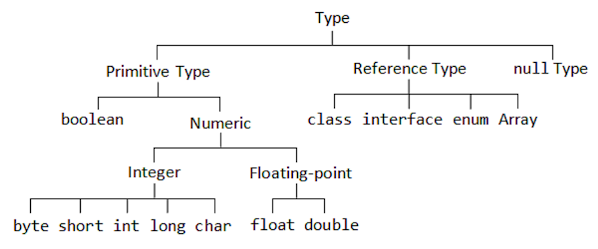
Primitive Variables: Store the actual value of the variable in memory.
-
Reference Variables: Store a handle/reference to an object is stored in memory. Reference variables are not pointers. More on these variables in the Object-Oriented Programming and Data Structures sections
In this section, we'll focus primarily on the primitive variables.
Creating a Variable
Java is a statically typed language, meaning that every variable must be declared with a data type when the code compiles. This is to ensure that you are not trying to store text inside a "box" that's meant for a number. Primitive variables can only be declared with primitive data types, including:
byteshortintlongbooleanfloatdoublechar
Variable Formula
The general formula for creating any primitive variable is:
[data type] [variable name] = [value];
Declaration
The first step of creating a variable is to declare it. To do so, you must tell Java what data type the variable is storing, and the name of the variable.
int numMotors; // Reserves a memory location for an integer called numMotors
Initialization
Then, once the variable is declared, it can be initialized. To initialize a variable, simply set it equal to its value.
numMotors = 4; // Sets the numMotors variable to the integer value of 4
A shortcut approach to creating a variable is to declare and initialize the variable on the same line, like so:
int numMotors = 4; // Declares and initializes the numMotors variable
Strings
Strings are objects that represent a sequence of characters. Strings are an example of a
reference variable, since they are a handle to an object of the String class stored in memory. Strings are initialized with a string literal, which is surrounded
with quotes.
Strings, while they are an object, can be declared and initialized the same way as a primitive variable.
String frcYear = "2026"; // Declaring a String with name frcYear and string literal of 2026

For more information about objects, such as Strings, check out the Object-Oriented Programming section.
Assigning and Comparing Values
Assigning Variables with... Variables
When assigning a variable's value to a primitive variable, the value is copied.
int i = 1;
int j = i; // The variable j would be equal to i, which is 1

i += 2;

System.out.print(i + " " + j);
Output:
3 1
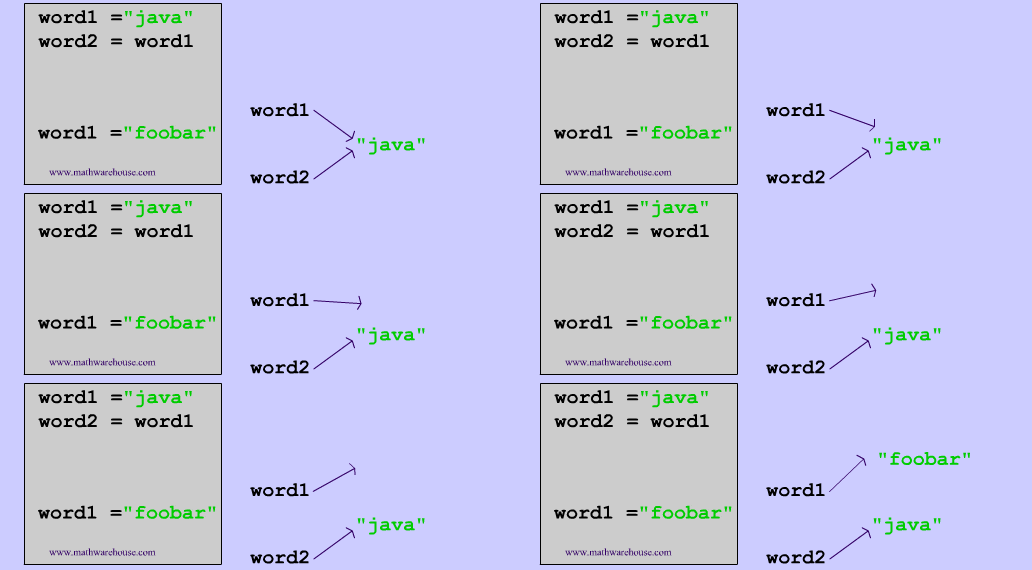
However, for a reference variable, the handle is copied, meaning that the reference type object isn't copied. Therefore, the object is "shared" between the two reference variables.
String greeting = "hi";
String greeting2 = greeting;

greeting2 += ", hello";

System.out.print(greeting);
System.out.print(greeting2);
Output:
hi
hi, hello
Comparing Variables
When comparing values with the == operator, it's important to note that if you are
comparing primitive variables, their values will be compared, while if you are comparing
reference variables, their addresses are compared.
int i = 1;
int j = 1;

String greeting = new String("hi");
String greeting2 = new String("hi");

if (i == j)
  System.out.println("i and j are equal");
else
  System.out.println("i and j are not equal);

if (greeting == greeting2)
  System.out.println("the greetings are equal");
else
  System.out.println("the greetings are not equal);
Output:
i and j are equal
the greetings are not equal
To compare reference variables, you must use the equals() method. More on this in the Control Flow and
Object-Oriented Programming sections.
Variable Scope
Variables have boundaries based on their scope (where they live).
- Local Variables: Declared inside a method or block of code. They only exist while that block of code is running and are destroyed as soon as the block is done executing
- Instance Variables: Declared inside a class but outside any methods. They belong to specific objects and persist in memory as long as the object exists
- Static Variables: Declared with the
statickeyword and belong only to the class itself
For more info, see the Object-Oriented Programming section.
Rules and Naming Conventions
Java syntax requires strict adherence to rules, and FRC 190 has some standard style conventions
Rules
- Names are case-sensitive:
numMotorsandNumMotorsare different variables - Names cannot start with a digit:
1stMotorCANIDis an illegal name - Names cannot use reserved Java keywords such as
class,public, orint - Names cannot have spaces
- Floating point literals default to
double. To differentiate a float from a double, you must add anfsuffix, and to differentiate a long from an integer, add anLsuffix (java automatically handles this, however)float velocityRadiansPerSecond = 0.5f;long bigNumber = 4500000000L;
Conventions
- Names should use camelCase:
numMotorsinstead ofNumMotors - Names should be descriptive:
numMotorsinstead ofnM - Names should have units:
velocityRadiansPerSecondinstead ofvelocity; - Constants (see next section) are in all caps:
ROLLER_SLOW_VOLTAGEinstead ofrollerSlowVoltage