GompeiLib
GompeiLib is a custom library that FRC 190 wrote to reuse code that has universal applications. GompeiLib is distrubuted through GitHub packages.
Using GompeiLib
Developers using GompeiLib should always use the latest version of GompeiLib from the current year released on GitHub
implementation 'edu.wpi.team190:gompeilib:2026.+'
Personal Access Token
To use GompeiLib in a project, generate a GitHub Personal Access Token (Classic).
Generating Access Token (GitHub)
- Go into your GitHub Account Settings
- Scroll down, Open Developer Tokens
- Go to Personal access tokens > Tokens (classic).
- Click Generate new token > Generate new token (classic).
- Name the token IE: GompeiLib
- Select 'read:packages' under 'write:packages'
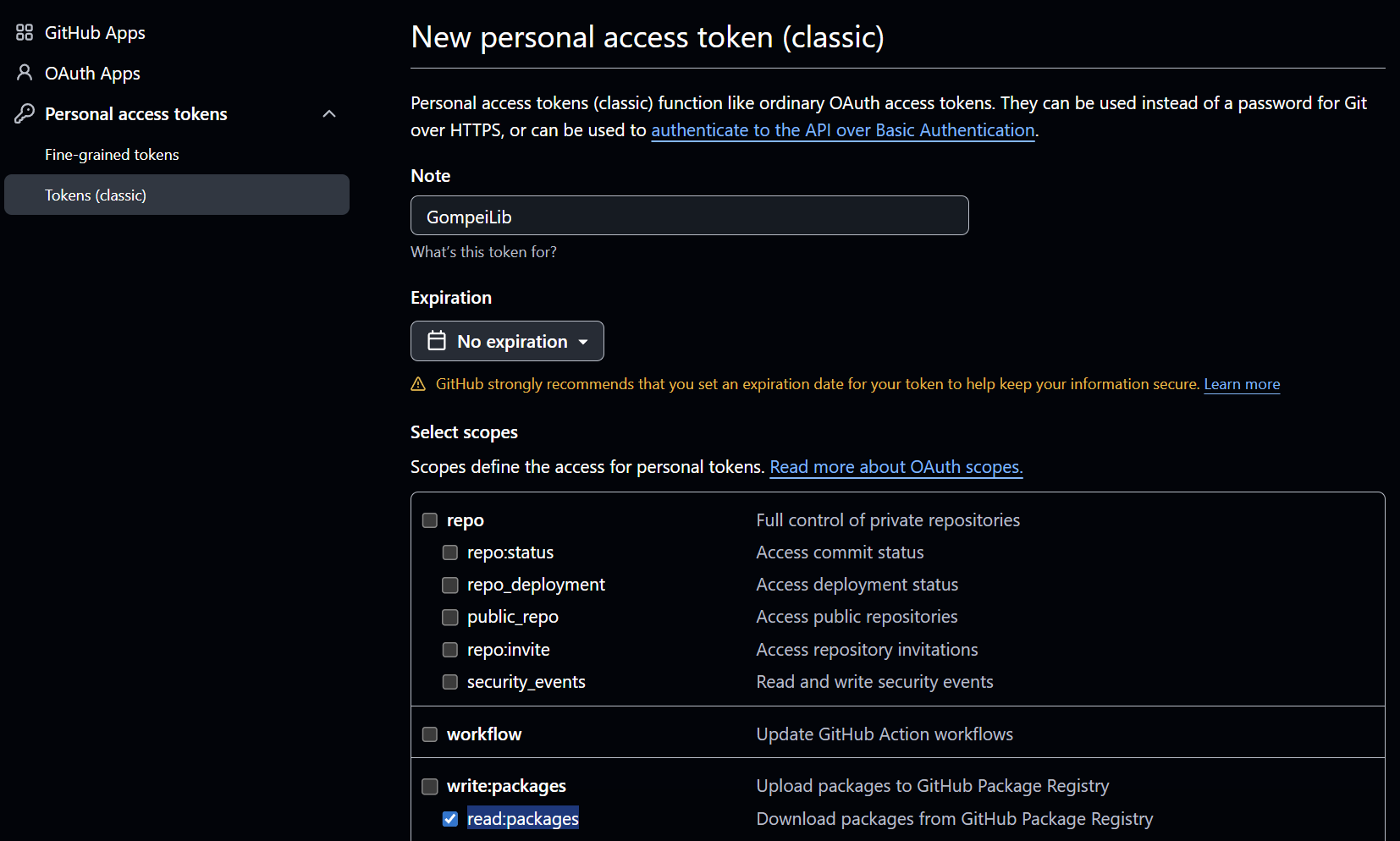
- Click Generate token(scroll down) and COPY THIS TOKEN AND STORE IT IN A SAFE LOCATION! You will NOT be able to see it again.
Create gradle.properties file
- Open / Create '.gradle/gradle.properties' file in your home directory
- Linux/Unix: ~/.gradle/gradle.properties
- Windows: C:\Users<insert_username>\.gradle\gradle.properties
- Open '.gradle' Folder > Click 3 Dots '. . .' on top bar > Click Options > Click View tab > Unselect Hide extensions for known file types > Click Apply
- Create 'gradle.properties' file as a .txt (remove the .txt in the file name) if you don't have one already
- Add the following lines, replacing the placeholders with your GitHub username and the generated token
gpr.user=<GIT_USERNAME>
gpr.key=<GENERATED_TOKEN>
EXAMPLE:
gpr.user=frc-190
gpr.key=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
Test Generated Token
- Build robot code with GompeiLib to see if your generated token works or if you followed the steps correctly.
Developing GompeiLib
Developers who would like to change GompeiLib should test their changes by publishing their changes to maven local, like so:
$ ./gradlew publishToMavenLocal
developers can then test their changes in their project by using the maven local version of the project. On 190, our gradle files are already set up so you can run the following to use maven local:
$ ./gradlew build -PuseLocalGompeiLib --refresh-dependencies
Contributing to GompeiLib
Developers who would like to push changes to GompeiLib should never merge to main, always merge to development
Releasing GompeiLib
Developers who need to release a new version of GompeiLib on GitHub should:
- Merge development to main
- Create a new release targeting main
- Tag the release using the following conventions:
- MAJOR VERSION: any time the year changes
- MINOR VERSION: any time the api changes
- PATCH: any fixes that don't change the API
ex. 2026.1.1